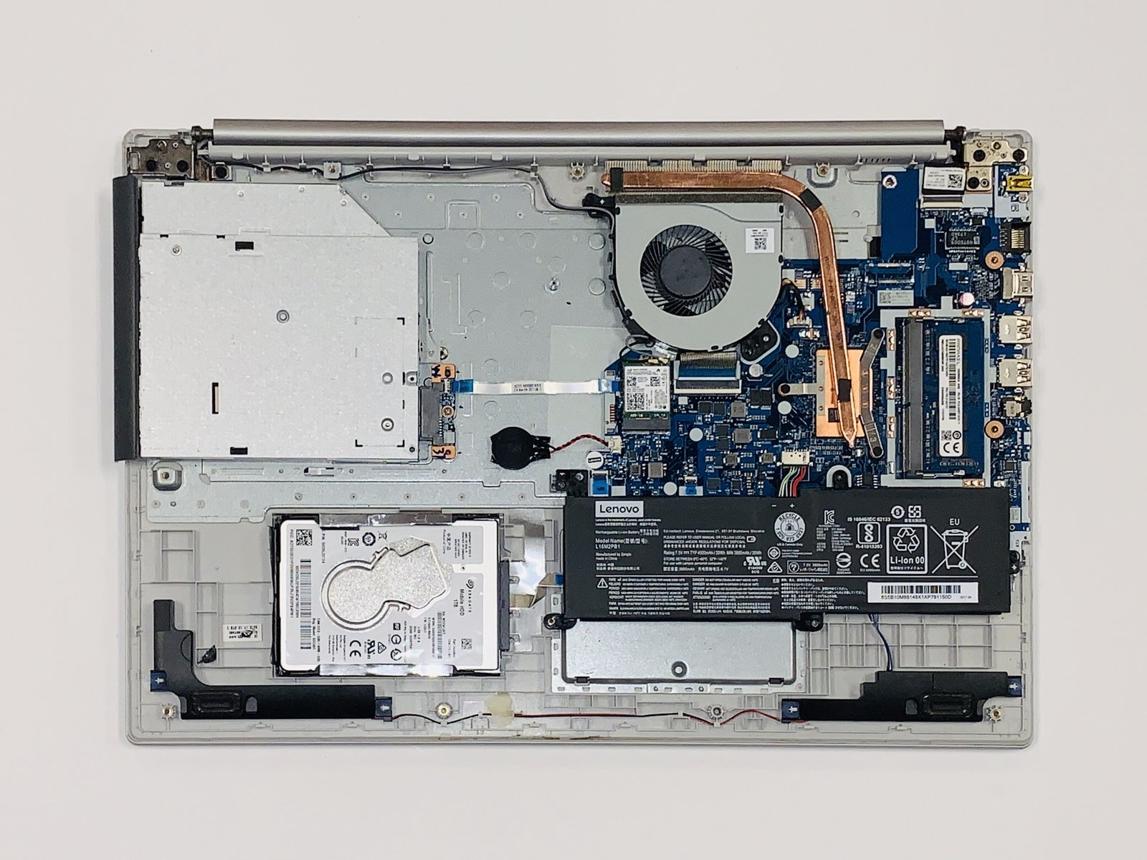

Lenovo Computer Parts: The Complete Guide to Finding, Buying, and Optimizing Your Lenovo Hardware
What Are Lenovo Computer Parts?
Lenovo computer parts refer to individual hardware components used in Lenovo laptops, desktops, and workstations. These parts can be:
- Replacement parts (for repairs)
- Upgrade components (to improve performance)
- Accessories (to enhance usability)
Most Common Lenovo Parts:
- Laptop batteries
- Screens (LCD/LED displays)
- Keyboards and trackpads
- RAM (memory modules)
- Hard drives (SSD/HDD)
- Motherboards
- Charging adapters
- Cooling fans
Popular Lenovo Devices and Their Parts
Different Lenovo product lines require different parts. Here’s a quick breakdown:
🔹 ThinkPad Series
- Business-focused laptops
- Durable, modular design
- Easy to replace parts like RAM, SSD, and batteries
🔹 IdeaPad Series
- Consumer-friendly laptops
- Affordable, but sometimes less upgradeable
- Common replacements: batteries, screens, keyboards
🔹 Legion Series
- Gaming laptops and desktops
- High-performance parts like GPUs, cooling systems
- Frequent upgrades: RAM and SSD
🔹 ThinkCentre / ThinkStation
- Desktop workstations
- Highly customizable components
- Ideal for CPU, GPU, and storage upgrades
How to Find the Right Lenovo Replacement Parts
Finding the correct part is critical. Ordering the wrong component wastes time and money.
Step-by-Step Process:
1. Identify Your Model Number
Look for:
- Bottom of your laptop
- Inside battery compartment
- System settings (Windows → About)
Example: ThinkPad T480, IdeaPad 3 15ITL6
2. Match Part Numbers (FRU Numbers)
Lenovo uses FRU (Field Replaceable Unit) numbers to identify exact parts.
👉 Always search using:
- “Lenovo T480 battery FRU”
- “Lenovo IdeaPad screen replacement part number”
3. Choose OEM vs Aftermarket
OEM (Original Equipment Manufacturer):
- Made by Lenovo
- Higher quality
- More expensive
Aftermarket:
- Third-party parts
- Cheaper
- Quality varies
Best Lenovo Parts to Upgrade for Performance
If your goal is speed and performance (especially for SEO professionals, marketers, or business users), these upgrades give the best ROI:
⚡ 1. Upgrade to SSD
- Replace HDD with SSD
- Improves boot time by 300%+
- Essential for modern workflows
⚡ 2. Increase RAM
- Go from 8GB → 16GB or 32GB
- Improves multitasking
- Critical for tools like Chrome, AI tools, and analytics platforms
⚡ 3. Replace Battery
- Restores portability
- Improves productivity for remote work
⚡ 4. Upgrade WiFi Card
- Better connectivity
- Faster speeds for cloud-based tools
Where to Buy Lenovo Computer Parts

7
Trusted Sources:
✔️ Official Lenovo Store
- Best for OEM parts
- Guaranteed compatibility
✔️ Authorized Resellers
- Certified Lenovo partners
- Reliable quality
✔️ Online Marketplaces
- eBay
- Amazon
- Newegg
Tip: Always check seller reviews and part numbers.
Common Mistakes to Avoid
❌ Buying Without Checking Compatibility
Even similar models can use different parts.
❌ Ignoring Voltage/Specs
Especially for:
- Batteries
- Chargers
❌ Choosing the Cheapest Option
Low-quality parts can:
- Damage your device
- Fail quickly
❌ Skipping Installation Research
Some parts are easy (RAM, SSD), others are complex (motherboard).
